Accept an invite
Who it’s for: Anyone a company has invited into its books — a bookkeeper, an admin, a viewer or another owner Where: The invite link → Sturdy ID → the Join page (app.sturdybooks.app/join) Before you start: The invite link from whoever invited you (SturdyBooks doesn’t email invites — a person sends you the link), and a Sturdy ID account with SturdyBooks access.
An invite is a one-time link. Opening it and signing in with Sturdy ID doesn’t add you on its own: you see which company and role you’ve been invited to, and nothing happens until you say yes.
-
Open the invite link. It takes you to Sturdy ID — sign in with the account you want to use for these books.
-
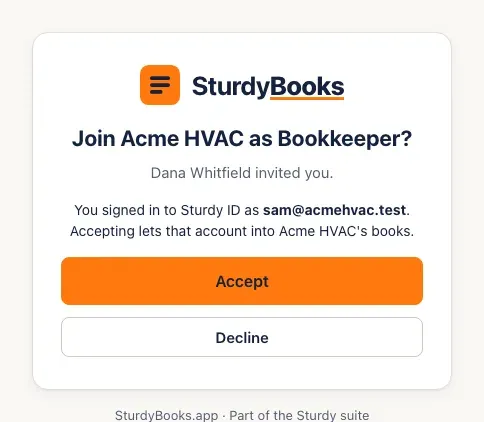
You land on the Join page. It asks Join Acme HVAC as Bookkeeper? (with your company and role), says who invited you, and shows the Sturdy ID you signed in with. Check that email — accepting links that Sturdy ID account to the seat.
-
Click Accept. SturdyBooks opens the company’s books.
- If the invite isn’t for you, click Decline. You’re taken to the sign-in page, which says You declined the invitation, so no seat was added.
-
From now on, just sign in with Sturdy ID — you don’t need the link again.
You’ll know it worked when…
Section titled “You’ll know it worked when…”Books opens with the company’s name at the top, and your role shows next to your name. On the company’s Team page your row changes from Invite pending to Active.
Notes & limits
Section titled “Notes & limits”- An invite link works once, for the first person who opens it and signs in with Sturdy ID, and it expires after 7 days. If yours has expired or was already used, ask for a new one — the owner or an admin clicks Re-invite on your row.
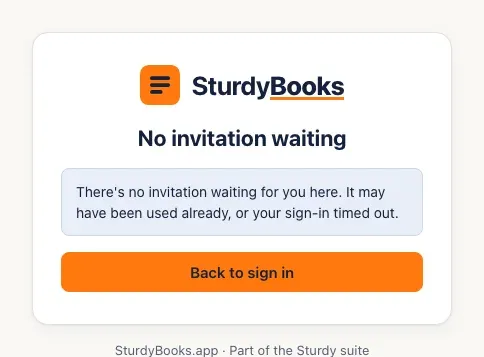
- If the Join page says No invitation waiting, the link was already used or your sign-in took too long. Open the invite link again, or ask for a new one.
- If Sturdy ID says it didn’t let you into SturdyBooks, your Sturdy ID account hasn’t been given SturdyBooks access yet. Ask your Sturdy administrator (whoever manages your company’s Sturdy ID accounts).
- Already work in another SturdyBooks company? Accepting adds this one; you then switch between them from the company name at the top.