Record a payment & apply a credit
Who it’s for: Owners, admins and bookkeepers Where: An invoice’s Record payment button, or Payments received → Record payment (also on Books → Quick actions) Before you start: The invoice is posted (drafts can’t be paid).
A payment is recorded once, for its full amount. You then say which open invoices it pays. Anything left over stays with the customer as a credit you can apply later.
-
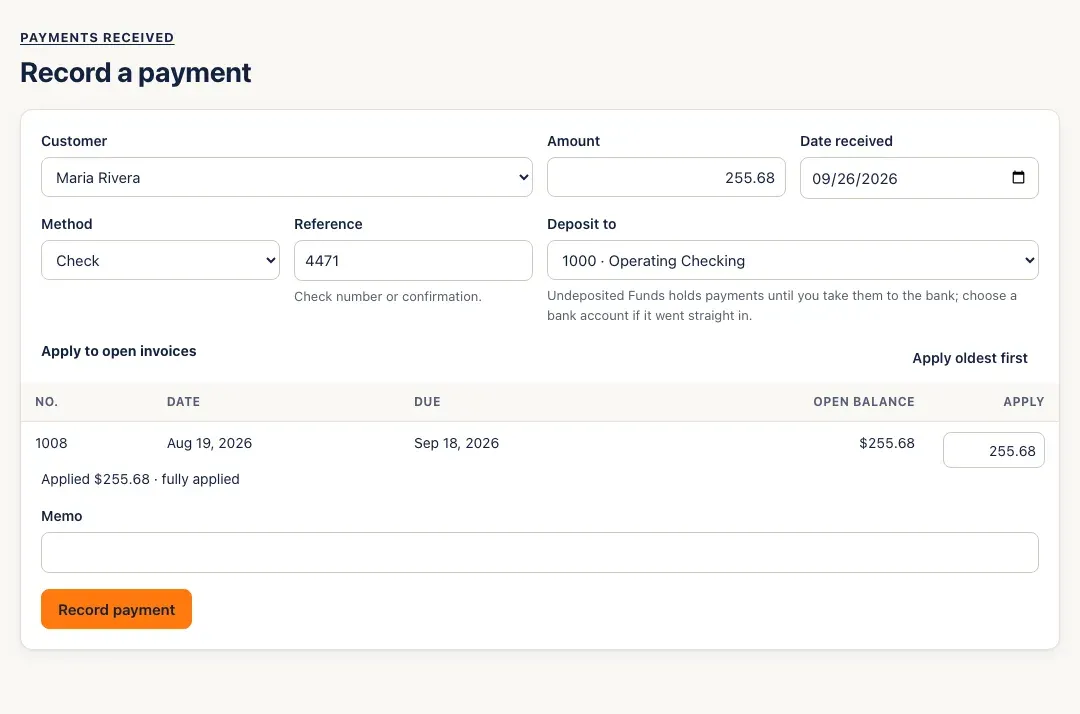
Open the invoice and click Record payment — SturdyBooks fills in the customer and the invoice’s balance and applies it to that invoice. Or open Payments received, click Record payment and choose the Customer.
-
Check the Amount and Date received, choose the Method (Check, Card, Bank transfer (ACH), Cash or Other) and add a Reference — the check number or confirmation.
-
Choose Deposit to. Undeposited Funds holds payments until you take them to the bank; if the money went straight into a bank account, choose that account.
-
Under Apply to open invoices, enter how much goes to each invoice, or click Apply oldest first. The line under the table keeps count: fully applied, or how much will be kept as a customer credit.
-
Add a Memo if you like and click Record payment. SturdyBooks shows the customer’s invoices, with the payment taken off their balances.
-
To apply a credit later, open Payments received. A payment with money left over shows it under Unapplied, with an Apply credit button.
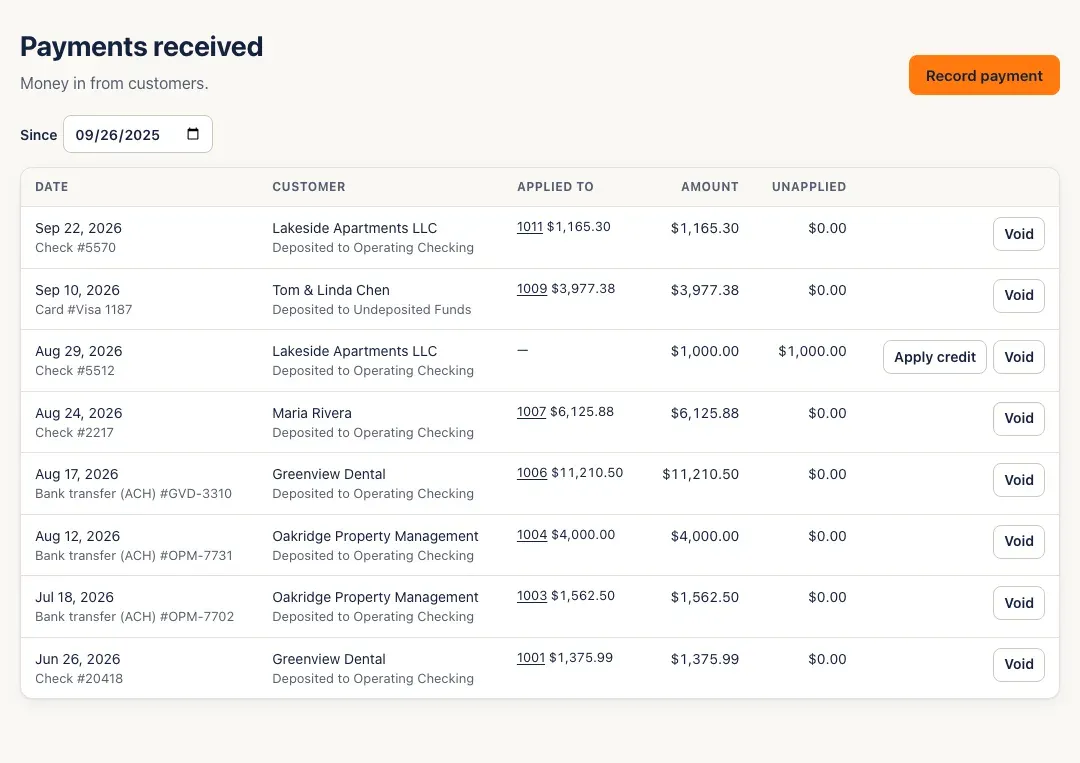
Click Apply credit. SturdyBooks lists the customer’s open invoices and fills in amounts, oldest first. Check the amounts and the Applied on date, then click Apply (the button shows the total).

You’ll know it worked when…
Section titled “You’ll know it worked when…”The invoice’s badge changes to Partly paid or Paid, and the payment’s row in Payments received lists the invoices it’s applied to.
Notes & limits
Section titled “Notes & limits”- A payment for more than the customer’s open invoices — or taken as a deposit before you invoice — stays as a credit. The A/R aging counts it under Current.
- You can’t apply more than an invoice’s balance (… has only $… left to pay), or more than the payment (You’ve applied more than the payment amount).
- Applied on can’t be earlier than the payment, or in a closed month. On the cash-basis profit & loss, the invoice’s income counts on this date.
- To undo a payment, click Void on its row and confirm. A payment is reversed on its own date, so one in a closed month can’t be voided until the month is reopened.
- Grouping several payments from Undeposited Funds into one bank deposit isn’t built yet. Record payments straight into the bank account they landed in, or move them with a journal entry — debit the bank account, credit Undeposited Funds.
- Payments received shows the last 12 months; change Since to see older payments.
- If your connection drops while you record a payment, the form locks and offers Retry, which sends exactly the same payment again — it can’t be recorded twice.