A/R & A/P aging
Who it’s for: Everyone — every role can read reports Where: Reports → A/R aging or A/P aging (or click Customers owe you / You owe vendors on Books) Before you start: Nothing.
A/R (accounts receivable) is what customers owe you. A/P (accounts payable) is what you owe vendors. The aging reports split each customer’s or vendor’s balance by how late it is.
-
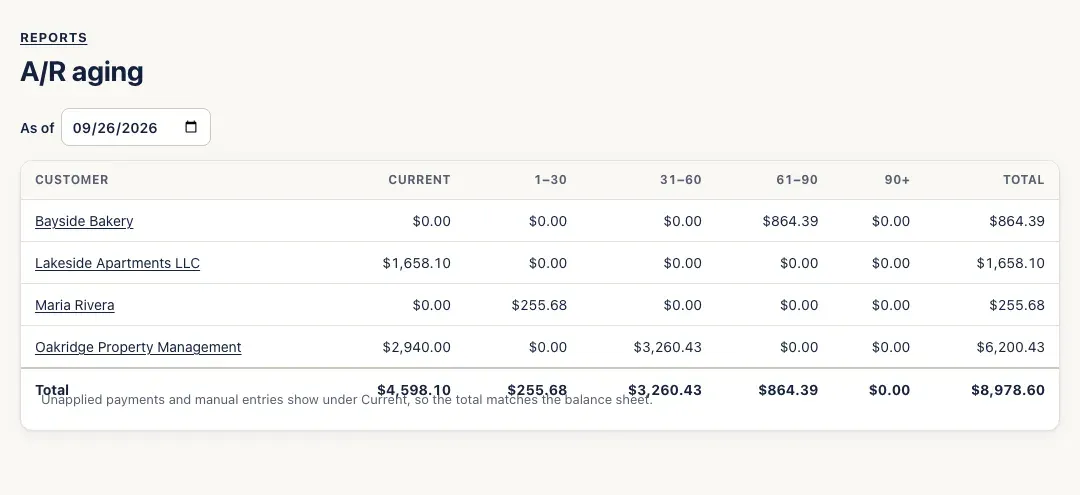
Open Reports → A/R aging. Each customer who owes you has a row, split into Current (not yet due), 1–30, 31–60, 61–90 and 90+ days past due, with a Total.
-
Click a customer to see their unpaid invoices — the place to follow up, or to record a payment.
-
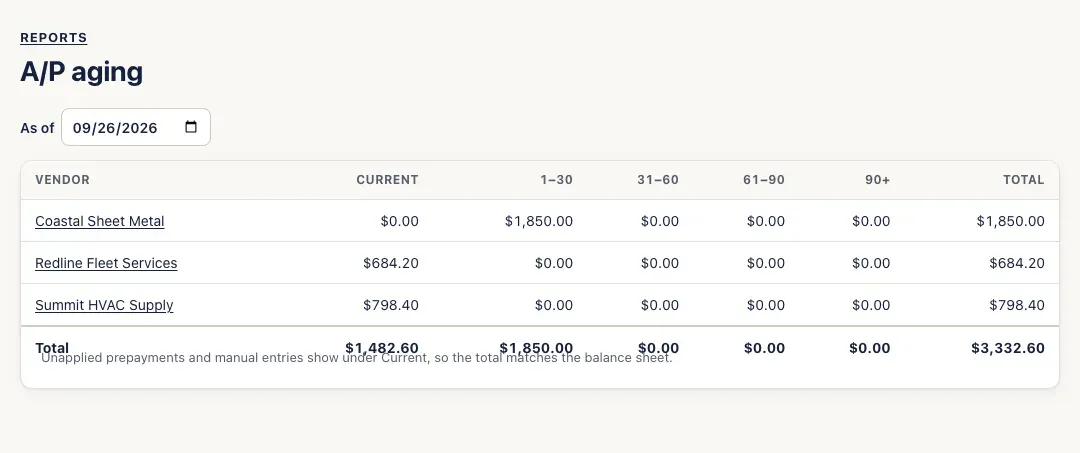
Open Reports → A/P aging for the same view of the vendors you owe. Clicking a vendor shows their unpaid bills.
-
To see the picture on another day — the end of last month, say — change the As of date.
You’ll know it worked when…
Section titled “You’ll know it worked when…”The A/R aging’s total matches Customers owe you on Books, and the A/P aging’s total matches You owe vendors. Both match Accounts Receivable and Accounts Payable on the balance sheet.
Notes & limits
Section titled “Notes & limits”- Money a customer paid that isn’t applied to an invoice yet (a credit or deposit) shows under Current, as a reduction — so the total still matches the balance sheet. The same goes for vendor prepayments and for journal entries on these accounts.
- Past due counts from each invoice’s or bill’s due date, which comes from the contact’s payment terms.
- When nobody owes you anything, the A/R aging says No one owes you anything. (A/P: You don’t owe anyone.)