Sign in with Sturdy ID
Who it’s for: Everyone with a seat in a SturdyBooks company Where: app.sturdybooks.app → Sign in with Sturdy ID Before you start: A Sturdy ID account that has SturdyBooks access, and a seat in a company. The owner’s seat is made when Sturdy Bid sets up the company; everyone else joins through an invite — see Accept an invite.
SturdyBooks has no password of its own. You sign in with Sturdy ID, the same sign-in you use for the other Sturdy products.
-
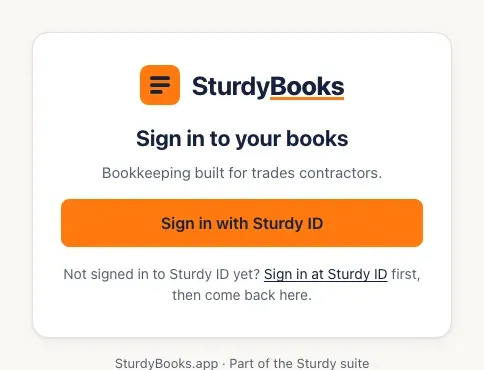
Go to app.sturdybooks.app. The sign-in page says Sign in to your books.
-
Click Sign in with Sturdy ID. You’re taken to Sturdy ID to sign in there. If you’re already signed in to Sturdy ID, it usually sends you straight back without asking for anything.
- Not signed in to Sturdy ID yet? The link under the button, Sign in at Sturdy ID, takes you there first; then come back and click the button.
-
After Sturdy ID, you land back in SturdyBooks — on the page you were trying to open, or on Books, your home page. If you work in more than one company, you land in the one you used most recently (see Switch companies).
-
When you’re done, click Sign out at the top right. The sign-in page confirms: You’ve signed out of SturdyBooks.
You’ll know it worked when…
Section titled “You’ll know it worked when…”Books opens with your company’s name at the top and Hi, (your first name). Your name and role show at the top right, next to Sign out.
Notes & limits
Section titled “Notes & limits”-
Sign-in never matches you by email address. Your Sturdy ID is tied to your seat when you accept your invite, and that’s the only way in.
-
A sign-in lasts up to 12 hours. When it ends, SturdyBooks sends you to the sign-in page and, after you sign in again, back to the page you were on.
-
If an owner or admin disables your seat, you’re signed out at your next click.
-
If the button is greyed out and the page says Sign-in with Sturdy ID isn’t available right now, wait a few minutes and try again.
-
If sign-in doesn’t finish, the sign-in page says why in a red box — for example, when your Sturdy ID isn’t linked to any company yet:
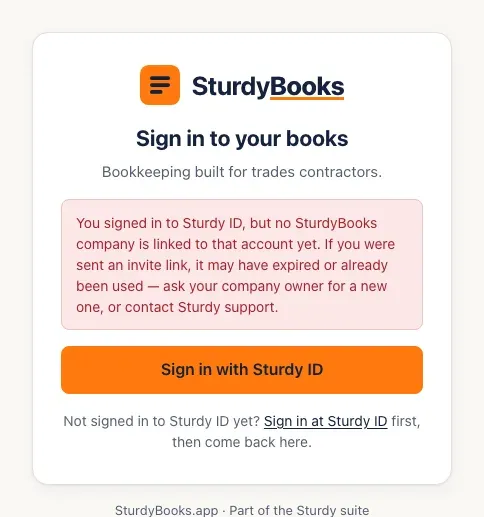
Troubleshooting explains each message and what to do.