Balance sheet
Who it’s for: Everyone — every role can read reports Where: Reports → Balance sheet Before you start: Nothing.
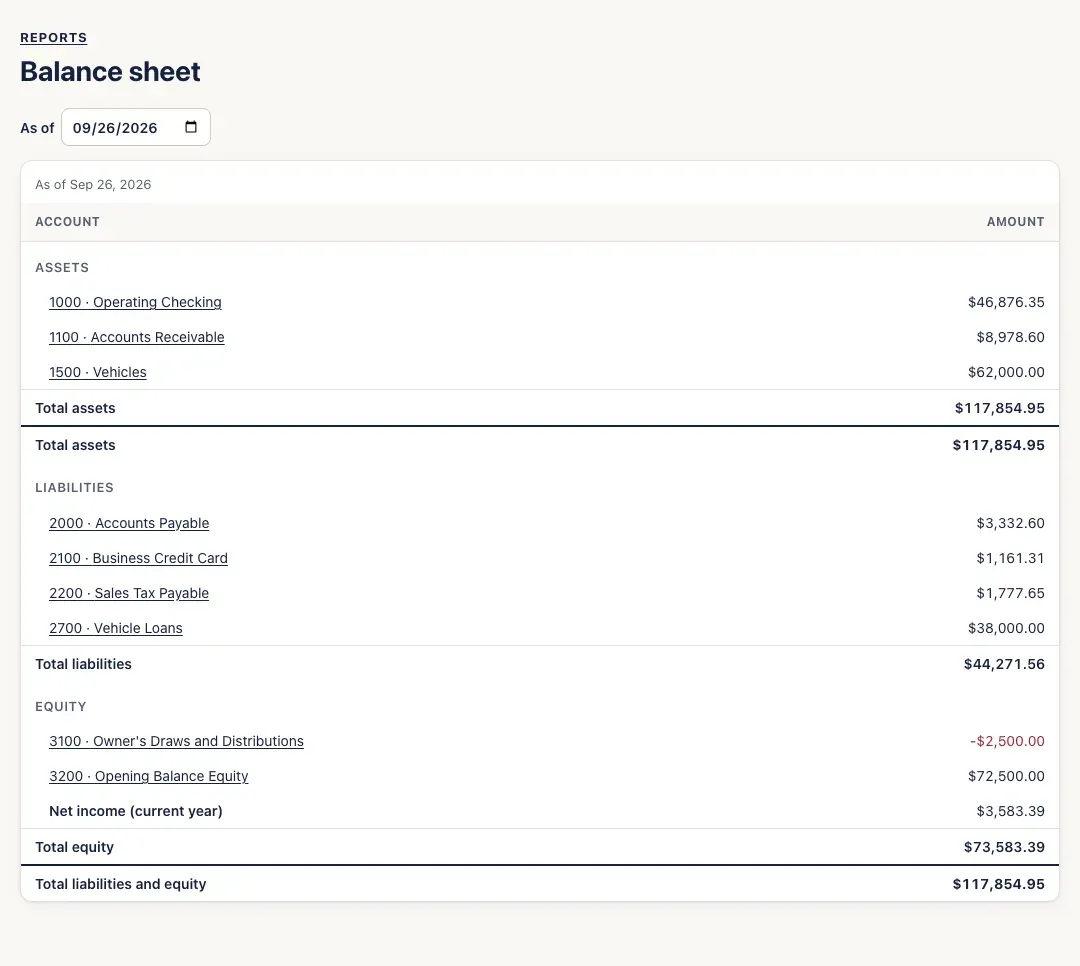
The balance sheet is a snapshot on one day: assets (what the business owns — bank accounts, money customers owe you, vehicles and equipment), liabilities (what it owes — unpaid bills, the credit card, sales tax collected, loans) and equity (the owner’s stake, including this year’s profit so far).
-
Open Reports → Balance sheet. It opens as of today.
-
To see another day — the end of last month or last year, say — change the As of date.
-
Click any account to open its register (the general ledger).
You’ll know it worked when…
Section titled “You’ll know it worked when…”Total assets equals Total liabilities and equity. It always should.
Notes & limits
Section titled “Notes & limits”- Net income (current year) is this fiscal year’s profit up to the date you chose. It isn’t an account, so it has no register to open.
- Retained Earnings holds every earlier year’s profit. At the start of each fiscal year, last year’s profit moves there on its own — there’s no year-end entry to make.
- Accounts with a zero balance aren’t listed.
- If the page ever says This balance sheet does not balance, that should be impossible — please tell support.