Switch companies
Who it’s for: Anyone with a seat in more than one company — an owner of two businesses, or a bookkeeper who keeps books for several contractors Where: The company name at the top right of every page Before you start: A seat in each company. Each company invites you separately (see Accept an invite).
Each company’s books are completely separate. You work in one company at a time, and your role can be different in each.
-
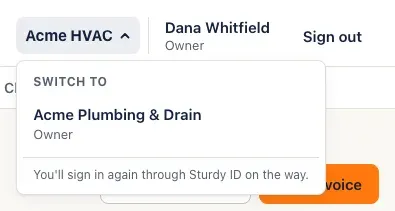
Click the company name in the top bar. A Switch to list shows your other companies, with your role in each.
-
Click the company you want. As the menu says, you pass through Sturdy ID on the way — usually without having to type anything — and land on that company’s Books page.
-
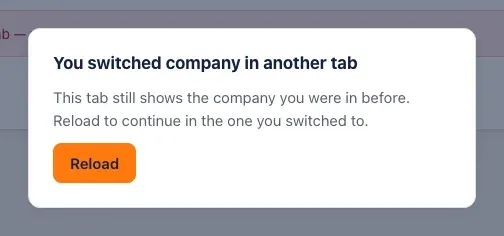
If you had SturdyBooks open in another browser tab, that tab shows You switched company in another tab the next time you use it. Click Reload to carry on there in the company you switched to.
You’ll know it worked when…
Section titled “You’ll know it worked when…”The top bar shows the new company’s name, and Books greets you with that company’s numbers.
Notes & limits
Section titled “Notes & limits”- If you only have a seat in one company, its name at the top is just a label — there’s no menu.
- All your tabs share one sign-in, so they all move to the company you switched to. That’s why an older tab stops and asks you to reload instead of letting you keep working in the other company’s books. Anything you’d already saved is safe; a form you hadn’t saved in that tab needs filling in again.
- When you sign in, SturdyBooks opens the company you used most recently.