Close the books (close, lock, reopen)
Who it’s for: Owners and admins Where: Close the books (second row of the top bar) Before you start: The month is reconciled — every invoice, bill, payment and expense for it is in and checked against your bank and card statements.
Closing a month stops anything changing behind you once you’ve signed it off. Locking it — once taxes are filed — stops everything, adjusting entries included.
-
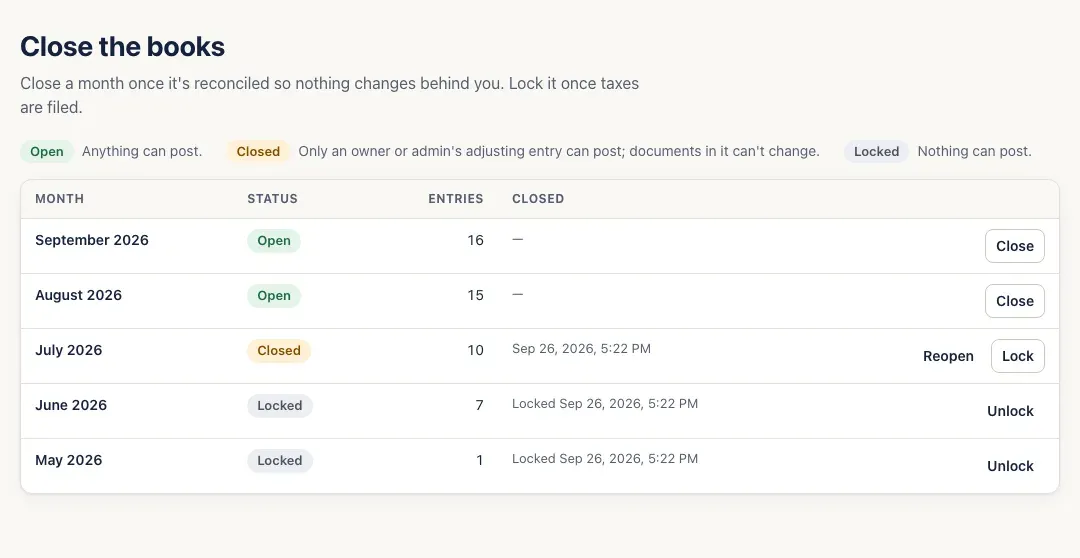
Open Close the books. Every month with postings is listed, newest first, with its status and number of entries. The key at the top explains the three statuses:
- Open — anything can post.
- Closed — only an owner or admin’s adjusting entry can post; documents in it can’t change.
- Locked — nothing can post.
-
When a month is reconciled, click Close on its row. Months close in order, oldest first — close the earlier months before a later one.
-
Once taxes for a closed month are filed, click Lock. Months lock in order too.
-
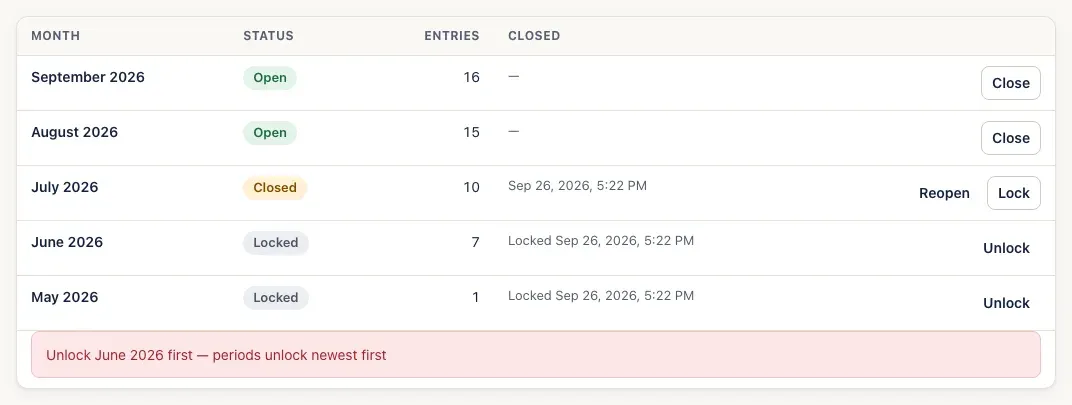
Need to change something in a closed month? Click Reopen on it (for a locked month, Unlock it first, then Reopen). Reopening and unlocking go newest first. If you pick a month out of order, SturdyBooks tells you which month has to move first.
-
After you close a month, Books says how far your books are closed, with a Manage periods link back to this page.

You’ll know it worked when…
Section titled “You’ll know it worked when…”The month’s status changes to Closed (or Locked), with the date and time it was closed (or locked) beside it.
Notes & limits
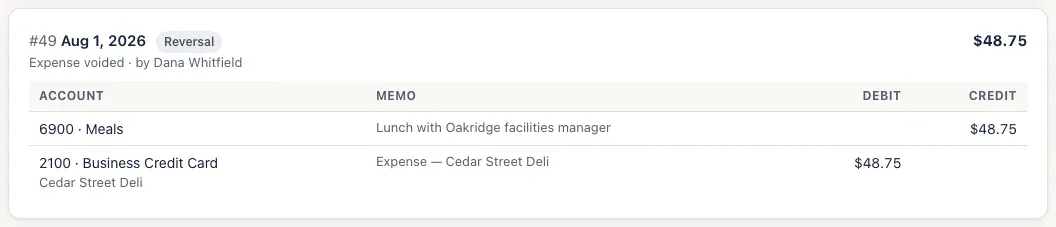
Section titled “Notes & limits”- Voids from a closed month land on the first open day. Voiding an invoice, bill or expense dated in a closed month doesn’t reopen it: the reversal is dated the first day after your closed months. For example, voiding a July expense after July is closed posts the reversal on August 1, in the journal:
- Changing the amounts, lines or date of an invoice, bill or expense in a closed month is refused with a message naming the month — July 2026 is closed — reopen it first (an owner or admin can also post an adjusting entry into it). Reopen the month, make the change, and close it again.
- Payments are different: voiding a payment or bill payment reverses it on its own date, so one dated in a closed month can’t be voided until you reopen that month. An invoice with a payment applied in a closed month can’t be changed until you reopen it, either.
- To correct a closed month without reopening it, an owner or admin can post an Adjusting journal entry dated in it — see Post a journal entry. A locked month takes nothing at all.
- A customer credit can’t be applied with a date in a closed month.
- A month only appears here once something has posted in it.
- Your fiscal year can’t change once any month is closed (see First-time setup).