Your books at a glance
Who it’s for: Everyone Where: Books — the first link in the top bar (or click the SturdyBooks logo) Before you start: Nothing — Books is where you land after signing in.
-
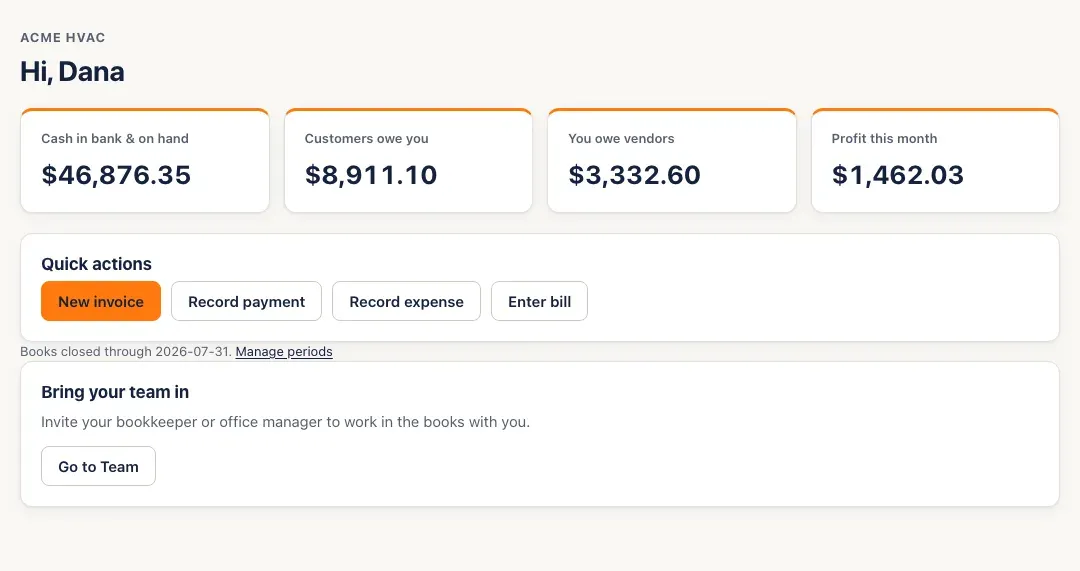
Open Books. It greets you by name under your company’s name.
-
Read the four tiles. Each one opens the report behind it:
- Cash in bank & on hand — what’s in your bank and cash accounts today. Opens the chart of accounts.
- Customers owe you — everything customers still owe. Opens the A/R aging.
- You owe vendors — every unpaid bill. Opens the A/P aging.
- Profit this month — this calendar month’s profit on the accrual basis. Opens the profit & loss for the month.
-
Use Quick actions for the everyday jobs: New invoice, Record payment, Record expense and Enter bill. You only see the ones your role can do.
-
Find everything else in the top bar. The first row has Books, Invoices, Bills, Expenses, Receipts and Reports; on the right are your company, your name and role, and Sign out. The second row has Customers & vendors, Payments received, Bill payments, Journal, Chart of accounts, Close the books, Rules and Team.

You’ll know it worked when…
Section titled “You’ll know it worked when…”The tiles show amounts. Click any tile and the report behind it opens with the same number.
Notes & limits
Section titled “Notes & limits”- Every number is read from your books when the page opens — there’s nothing to refresh or sync.
- Owners and admins also see Bring your team in, which opens Team.
- Once you’ve closed a month, a line under Quick actions says Books closed through that date; Manage periods opens Close the books.
- Viewers see the tiles and can open every page, but have no Quick actions — their access is read-only.
- If you see Your books are being set up, your company’s chart of accounts hasn’t been created yet. It’s created automatically when Sturdy Bid sets up the company, so contact support and we’ll finish it.