General ledger
Who it’s for: Everyone — every role can read reports Where: Reports → General ledger, or click an account (or its balance) in any report or the chart of accounts Before you start: Nothing.
-
Open Reports → General ledger. It opens on this month, for every account with postings; change the period with Choose a period… or From and To.
-
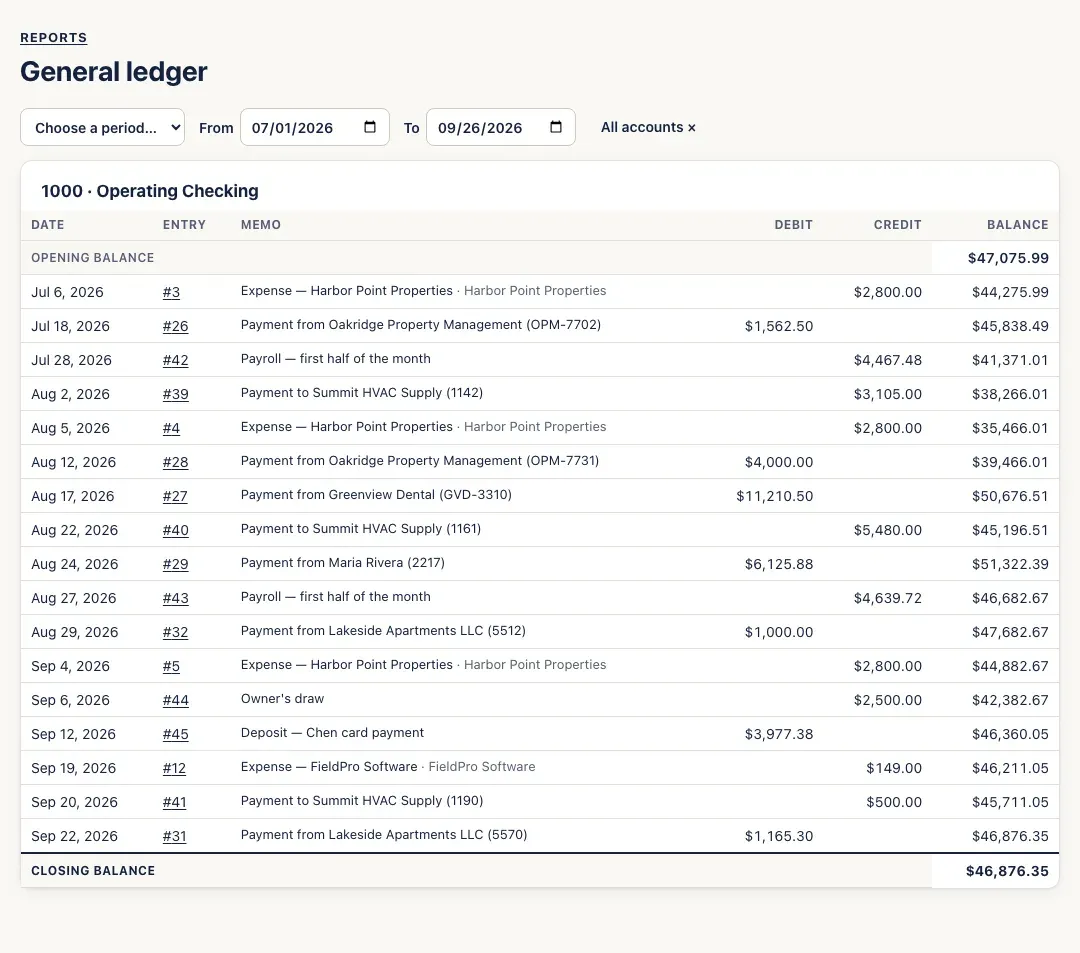
To see one account’s register, click its name in a report, or its balance in the Chart of accounts. Each account shows its Opening balance, every posting with its Date, Entry number, Memo (and customer or vendor), Debit, Credit and running Balance, and its Closing balance.
-
Click an entry number to open that entry in the Journal — and from there, the invoice, bill or expense behind it.
-
Click All accounts × to go back from one account to every account.
You’ll know it worked when…
Section titled “You’ll know it worked when…”Each account’s Closing balance matches its balance on the trial balance for the last day of the period.
Notes & limits
Section titled “Notes & limits”- If the dates you choose cross the start of a fiscal year, Year end lines show where the year’s income and expenses closed into Retained Earnings. They’re worked out for the report, not entries you can open.
- For a very busy stretch, the report may say there are too many postings to show at once. Narrow the dates or pick one account — until you do, the closing balances shown are incomplete.