Cash flow
Who it’s for: Everyone — every role can read reports Where: Reports → Cash flow Before you start: Nothing.
Profit and cash aren’t the same thing. A big invoice nobody has paid yet is profit but not cash; paying down a loan is cash out but not an expense. The cash flow report starts from your net income and walks through the differences, ending at the change in your bank and cash accounts.
-
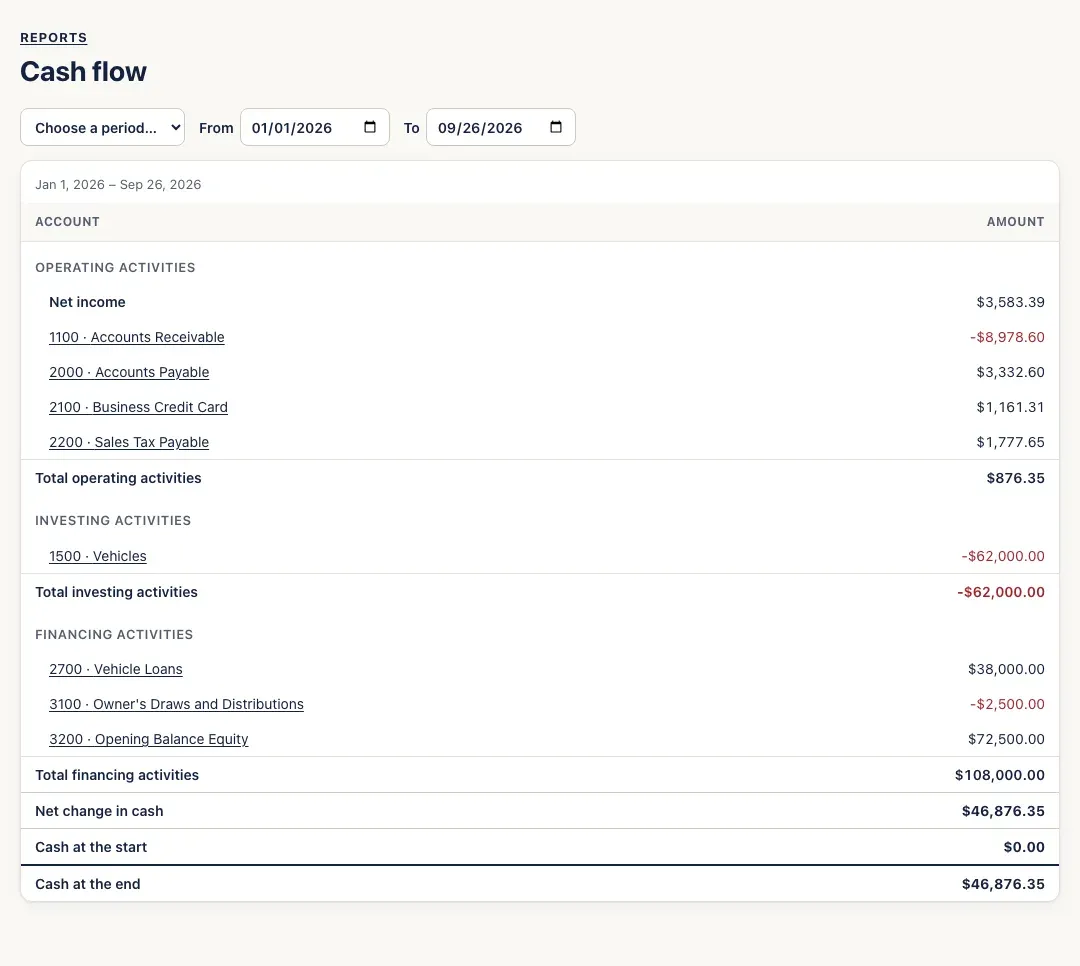
Open Reports → Cash flow. It opens on Year to date; change it with Choose a period… or From and To.
-
Read it top to bottom:
- Operating activities — your net income, adjusted for money tied up or freed in day-to-day business: customers owing you more (less cash), vendors and the credit card owed more (more cash), sales tax collected but not yet paid over, and so on.
- Investing activities — buying or selling vehicles, equipment and other long-term assets.
- Financing activities — loans taken or repaid, and the owner putting money in or taking draws.
- Net change in cash, then Cash at the start and Cash at the end of the period.
-
Click any account to see its postings for the period.
You’ll know it worked when…
Section titled “You’ll know it worked when…”Cash at the start plus Net change in cash equals Cash at the end — and Cash at the end matches your bank and cash accounts on the last day of the period.
Notes & limits
Section titled “Notes & limits”- “Cash” here means your bank and cash-on-hand accounts. Money waiting in Undeposited Funds isn’t counted as cash until you record it in the bank.
- A negative number (in red) is cash going out.